Showing posts with label review. Show all posts

Tuesday, 8 April 2014

The new SLR in town - the Canon EOS 1200D

Image Source: Canon India
Canon has put itself into a challenge by bringing out this baby DSLR into the market. With its rivals, Nikon bringing out fully loaded entry level SLRs like D3200, D5200, will Canon live upto their customers' expectations? And this one is considered to be an update to the Canon EOS 1100D. But the question is, is the new Canon EOS 1200D a worth buy SLR for beginners? Let's take a look. 

This entry level DSLR comes in 2 different kit combinations - Kit I (with Canon 18-55) and Kit II (with Canon 18-55 and 55-250). Most of the customers remarked this Canon product as highly priced, with the body itself costing you Rs 30k! Moreover, beginners are into investing less on their first camera and that's one draw-back of this entry level DSLR.

The most striking feature I found is that this camera is app-enabled. The app gives you the complete guide on using your first SLR and also has pretty good challenges for you. The app is available to iOS and Android users.


Image Source: Flickr


You can capture sharp images with the 18 megapixel APS-C size CMOS sensor. The Canon 1200D comes with a 3-inch screen which is not touch-responsive and is stationary, no swirling. Shooting in low-light has been brilliant with this one as you have an ISO range from 100-6400 (expandable to 12,800). It comes with an in-built flash, which can come in handy for beginners. The focusing has been decent but is a bit slow. 

Unlike, the Nikon entry level SLRs, this one lacks has only 5 creative filters, has got 9 AF points, and there's no mic feature for shooting videos. That puts the 1200D aka Rebel T5 one step below the Nikon SLRs. Though with Canon's wide lens-range, you can make most out of this one. 

I think the 1200D is ideal for shooting nature, landscape, macro, portraits and not fit for sports and action photography. Infact, the ratings for this product has been pretty low. If you have your budget fitted to buy this SLR with expensive lenses, then go for it! And one more thing. Instead of buying this one, with the same budget you can get better processor, faster burst-rate, larger screen, by buying the Canon EOS 100D. You can even look out for the Nikon SLRs. Also, take a look at the below video!


Friday, 22 November 2013

Instagram Update


Taddaaa!! I'm back. This time I thought of showing you some of my photographs from Instagram. My card reader isn't working and I am unable to upload the photographs on my SLR. So I thought I will update my blog with my Instagram updates until I get a new card reader. So you have it, my new post 'Instagram Update'!


Instagram has been so popular now that millions of people post thousands of photos daily on this online photo-sharing network. Not only photographers, but common people too love using this wonderful app. After Facebook bought Instagram on April 2012, things have changed. It's now available to a wide range of users as it is now available on iOS, Android and Windows devices too. 

I love uploading my photographs on Instagram. Found an awesome subject? Take out your mobile, open Instagram, click.. click and click. Then add a filter and Share! Done. That's all you need to do and it cannot get simpler than this. Some of the filters available on the app are X Pro II, Toaster, Inkwell, Walden, Hefe, Nashville, etc. Instagram keeps bringing out new filters with every app update. That's what I love about the app. Now, you can even upload and edit short videos! Sharing has been fantastic in this app. Select where you want to share. Maybe it's Twitter or Facebook or Tumblr or any other social networking site, a tap can share your Instgram images on these platforms. 

Here are some of my latest images on Instagram. Hope you like them! So what are you waiting for? Download the Instgram app on your smartphone and start clicking some amazing snaps. Don't forget to follow ME on Instagram. More in the next post, till then Adios!

Instagram


Saturday, 23 March 2013

A sneak peek: Make Retro


Make Retro is an easy online application that allows you to add some wonderful filters to your photos. You may either upload a picture from your computer or just add an URL of the image. The site has a total of 6 filter which seem to be very helpful for those who just want to make their photos look wonderful in a limited time.

The site doesn't have any complicated steps. You just need to select an image, choose an effect and click on 'Create Image'. That's it! Your image will be ready in no time. You also have an option to whether have retro on or off. The simple filters include Lomo, Chrome, Diana, Vintage, Technicolor 2 and Technicolor 3. Once you have added a filter and created an image, you can easily save it by right clicking on the image and  clicking 'Save image as'. Looks easy, isn't it? So, give it a try guys, picture ready in seconds.

Wednesday, 13 February 2013

Beginners' Guide: Buying a Camera


If you are a beginner in photography and ready to buy a camera, then you are in the right place! Here, are some of the cameras which are very well suited for beginners. There is sufficient information about the camera you need to know. Only thing is choose the one which suits you the best..

One common mistake people do while buying their first camera is that they buy a professional and costly one. Instead of doing this, the person can invest money for a cheap SLR and a costly lens. Lens matters more than a camera! Take a look at some of the below cameras and their reviews.


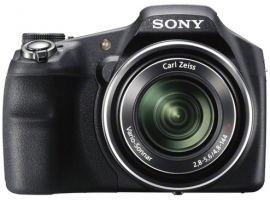
1. Sony Cyber-shot DSC-HX200V

This camera is not a DSLR, but this compact camera has been outstanding in its performance. If you are new to photography and  usually take photos of distant objects(eg. bird photography), then this is the right choice. It's pictures are decent and Sony offers its best services.

Source: sony.co.in

 Key Features:
  • 18.2 Megapixel
  • 30X Optical Zoom
  • 720p HD Quality Video Recording
  • CMOS Sensor
  • High speed Auto Focus
Price: Rs. 24,990


2. Canon EOS 1100D

This camera has been pretty outstanding in its performance and picture quality. If you are a Canon lover, then its ideal that you buy this camera and invest for a costly lens. This camera has much to offer and it is a Best Buy! 


Source: canon.co.in

Key Features:
  • 12.2 Megapixel 
  • CMOS Sensor
  • ISO 100-3200, expandable to 6400
  • 9-point cross-type AF System
Price: Rs 26,990 ( Body + Kit 18-55mm IS II)


3. Nikon D3200 

This camera too is outstanding in performance with stunning images. If your budget is around Rs. 50,000 then buy this SLR with a 18-105mm VR lens. This combination is ideal for beginners. This is the next version of Nikon D3100, which had amazed many photographers. Nikon has been raising its standards by offering new features like Wi-Fi onto DSLRs.

Source: nikon.co.in

Key Features:
  • 24.2 Megapixel
  • CMOS Sensor
  • ISO 100-6400 
  • 4 frames per second 
Price: Rs. 36,450 ( with AF-S 18-55mm VR lens)


If you are still not satisfied with these cameras then look out for these:
  • Olympus Pen E-P3
  • Olympus Pen E-PM1
  • Olympus Pen E-PL3
  • Canon PowerShot G10
  • Canon 550D
  • Nikon D5200
  • Sony SLT-A37
  • Sony SLT-A55

We will reviewing more cameras soon... Thanks for reading. Let us know if you have comments. Bye!


Follow me on Hubpages!


Wednesday, 26 December 2012

500px - A Close Look

The population in 500px.com is increasing day by day. It has truly become a hub for photographers around the globe. Due to many reasons people from Flickr are migrating to 500px. It offers a lot to the photographers who keep uploading their works at this site. Lets take a closer look at the site.


 Young photographers can truly gain inspiration from the photos uploaded in this site. You can either create an account on this site or just connect your profiles from social networking sites. The first time you sign in you are given 14-day free Awesome trial, after 14 days you are a free user. A free user can use limited features of the site. You can either upgrade your profile to 'Plus' or 'Awesome' by paying an amount.


The site also offers users(Awesome) to create their own personal portfolio. Plus and awesome users can upload unlimited photos. Some other benefits are subdomain, google analytics, advanced statistics and more.


The site is beautifully designed and the theme has been pretty decent. Users can like, favorite and comment on others photo. When you upload a picture the site automatically provides information like ISO, Aperture, Shutter-speed, Camera, Lens etc used to take the respective picture. You can share the pictures using social buttons. Your photo is rated according to the number of likes it has gained.


The one main reason why people are migrating to 500px.com is that it offers users to sell their works. You can keep your photos up for sale in the market. You can also buy other's works. Users get a chance to either buy the print of a image or just download it. When a person buys your work you will get a part of the money paid by the buyer. Don't expect to get rich at the beginning. Keep uploading your works, as you become popular you may be ready to earn decent cash.


If you are not yet a member, I do suggest you to Join Now! If you want to enhance your photography skills or sell some of your works, then 500px.com is the right place. Hope you liked this review, Thank You!


Tuesday, 18 December 2012

PicMonkey - A better place to edit!


Source: Google Images


Some days earlier I just met an application called Picmonkey. It was one of the top rated apps on Chrome Store, which made me to download it! Its unlike other photo-editing apps as it provides free editing for users and the best part is there is no registration.

People who are looking for decent editing application except Photoshop are in the right place. You can transform your normal images to something unusual. People who want a edit for their profile pictures on Facebook can also find it useful.


It provides many awesome filters. They can add tan to their face, boost their blush and more. Decent fonts and overlays are also available. The smiley icons just amazed me and I use them regularly. Frames, textures and themes are some other ways by which you can make your photo more exciting!


Here are some snapshots of PicMonkey. You can either edit a photo or just select to Create a Collage. After editing you can share your posts directly to social sites like Facebook, Twitter, Google+ etc. Size of the image can also be selected.


Personally, I just love editing my pictures using PicMonkey. I just want to show you people some of my pictures edited using PicMonkey. I have also given the detail of the edit at the bottom of the image. Hope people will like this wonderful app and and also my review on it. Start Editing!
CHEERS!

Cross Process with Green at 50% and Dusk at 0%


Tranquil at 50% and dark edges.

LinkWithin

Related Posts Plugin for WordPress, Blogger...